Binary data
SQLite tables can contain binary data in BLOB columns.
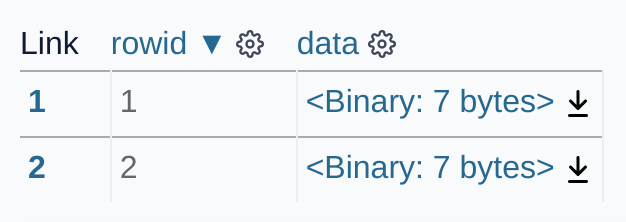
Datasette includes special handling for these binary values. The Datasette interface detects binary values and provides a link to download their content, for example on https://latest.datasette.io/fixtures/binary_data
Binary values in JSON
Binary data is represented in .json exports using Base64 encoding. Datasette uses this representation for every BLOB value, including binary values that could also be decoded as UTF-8 text.
https://latest.datasette.io/fixtures/binary_data.json?_shape=array
[
    {
        "rowid": 1,
        "data": {
            "$base64": true,
            "encoded": "FRwCx60F/g=="
        }
    },
    {
        "rowid": 2,
        "data": {
            "$base64": true,
            "encoded": "FRwDx60F/g=="
        }
    },
    {
        "rowid": 3,
        "data": null
    }
]
The same format can be used with the JSON write API.
If a column value in a row, rows or update object is a JSON object with exactly "$base64" set to true and an "encoded" string, Datasette will decode that Base64 string and store the resulting bytes:
{
    "data": {
        "$base64": true,
        "encoded": "FRwCx60F/g=="
    }
}
This works for inserts, upserts and updates. It also works when creating a table from example row or rows data: Datasette decodes the value before inferring the schema, allowing that column to be created as a BLOB column.
To store a JSON object with that exact shape literally, wrap it in a "$raw" object:
{
    "data": {
        "$raw": {
            "$base64": true,
            "encoded": "FRwCx60F/g=="
        }
    }
}
"$raw" unwraps exactly one layer. To store a literal "$raw" object containing a Base64 object, wrap it again:
{
    "data": {
        "$raw": {
            "$raw": {
                "$base64": true,
                "encoded": "FRwCx60F/g=="
            }
        }
    }
}
Linking to binary downloads
The .blob output format is used to return binary data. It requires a _blob_column= query string argument specifying which BLOB column should be downloaded, for example:
https://latest.datasette.io/fixtures/binary_data/1.blob?_blob_column=data
This output format can also be used to return binary data from an arbitrary SQL query. Since such queries do not specify an exact row, an additional ?_blob_hash= parameter can be used to specify the SHA-256 hash of the value that is being linked to.
Consider the query select data from binary_data - demonstrated here.
That page links to the binary value downloads. Those links look like this:
These .blob links are also returned in the .csv exports Datasette provides for binary tables and queries, since the CSV format does not have a mechanism for representing binary data.
Binary plugins
Several Datasette plugins are available that change the way Datasette treats binary data.
datasette-render-binary modifies Datasette's default interface to show an automatic guess at what type of binary data is being stored, along with a visual representation of the binary value that displays ASCII strings directly in the interface.
datasette-render-images detects common image formats and renders them as images directly in the Datasette interface.
datasette-media allows Datasette interfaces to be configured to serve binary files from configured SQL queries, and includes the ability to resize images directly before serving them.